For registered support organizations, language schools and employers

Understood. Connected. Support moves forward.

A portal for your staff, linked to the app your members use. Notices and checklists you write in Japanese reach each person in their own language. See who read them, who understood and who needs help, on one screen.

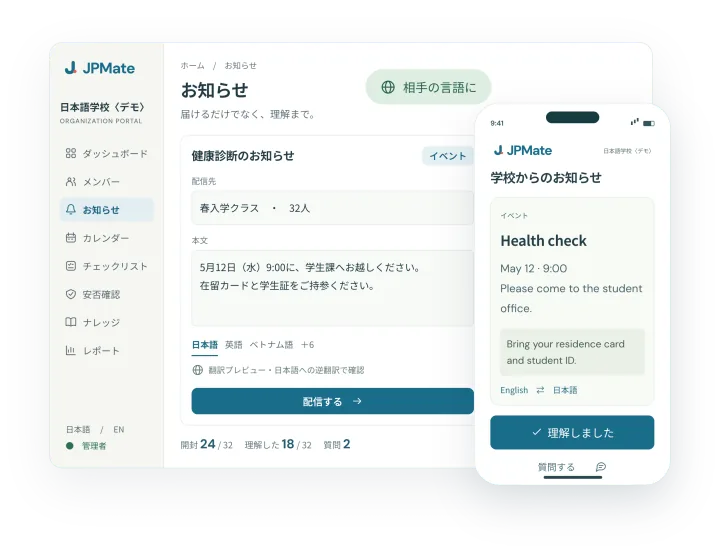
A notice written in Japanese in the staff portal arrives in English on a member’s phone, with counts of who opened, understood and asked a question

Demo screens, people and numbers. The portal is shown in Japanese; it also works in English.

Staff portal × member app

Your screen and their phone, connected.

What you send from the portal reaches each member’s app in their own language. Their replies and requests for help come back to the portal in Japanese.

01 Notices

From “sent” to “understood”.

Write a notice in Japanese and JPMate translates it into each member’s language. Check a back-translation into Japanese before you send. Send to everyone, a group or named people, now or at a set time.

  • StaffSee who opened it, who tapped “understood” and who asked a question. Remind only the people who haven’t, and reply in Japanese.
  • MembersRead it in their own language, confirm with one tap, and ask about anything unclear.
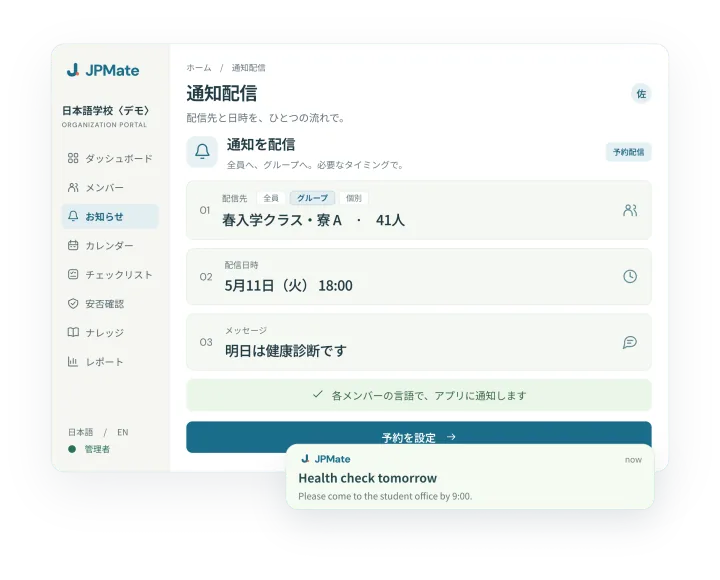
The staff portal choosing a group and a delivery time, and the notification arriving on a member’s phone
02 Knowledge

Your rules, answered in their language.

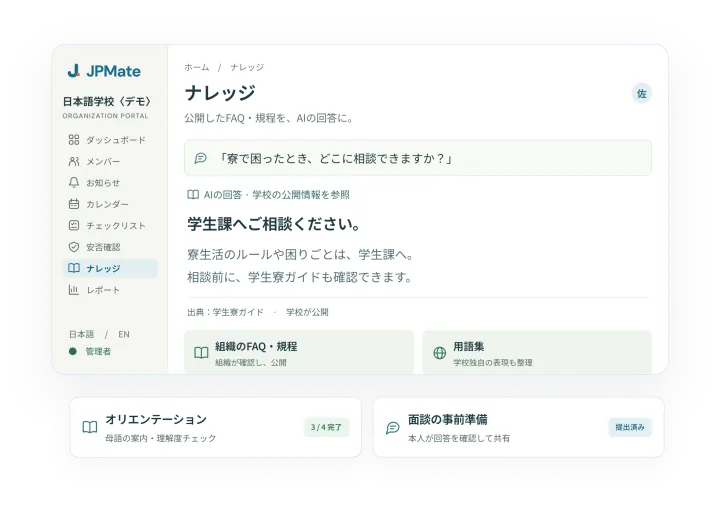
Upload dorm rules, work rules or school guides as PDF, Word or photos, check them, and publish. When members ask in their own language, AI answers from your documents and shows the source.

  • StaffQuestions it couldn’t answer are grouped into themes every week. Each FAQ you add widens what it can answer.
  • MembersAsk as often as they need, at any hour, in their own language.
The knowledge screen, where AI answers from the organization’s FAQs and policies with the source shown
03 Checklists and calendar

Everyone knows what to do next.

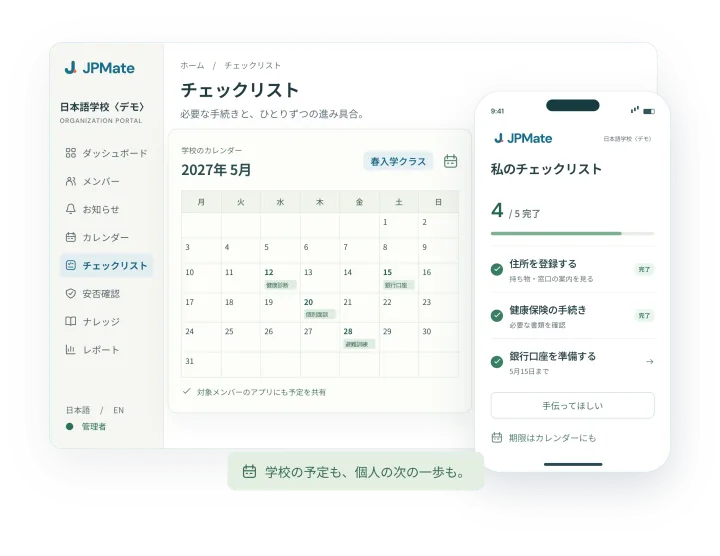
Arrival procedures and the steps before school or work start reach each person as a checklist timed to their own start date. Events and deadlines go on a shared calendar that also shows in the app.

  • StaffSee how far each person has got, and spot overdue steps and requests for help at once.
  • MembersSee the next step and what to bring, in their own language, and tick it off when done.
The checklist and calendar in the staff portal, and a member’s own checklist on their phone
04 Safety checks

Know who is safe, fast.

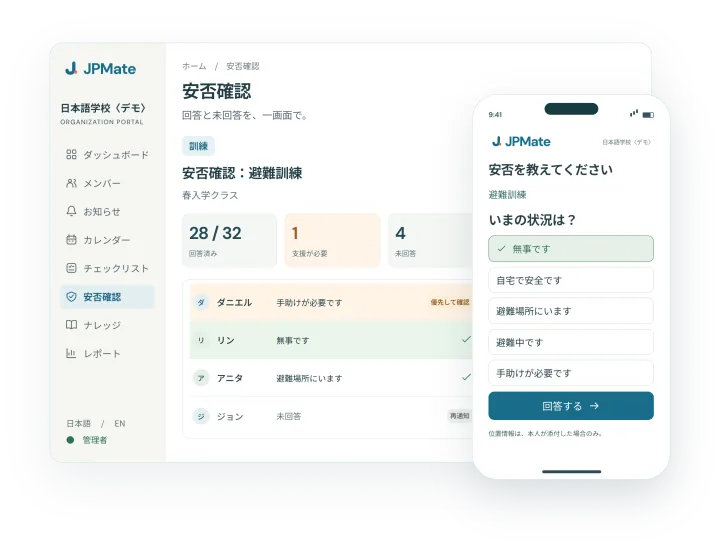
After an earthquake or heavy snow, ask everyone at once with one button. Drills for earthquake, snow, typhoon and fire are ready to use.

  • StaffAnswers come in live, with people who need help and people who haven’t answered shown first. Non-responders get reminded automatically.
  • MembersAnswer in one tap, in their own language.

Not a replacement for emergency services or official alerts.

Safety-check answers in the staff portal, and the answer screen on a member’s phone
05 Overview and records

See the support. Keep the record.

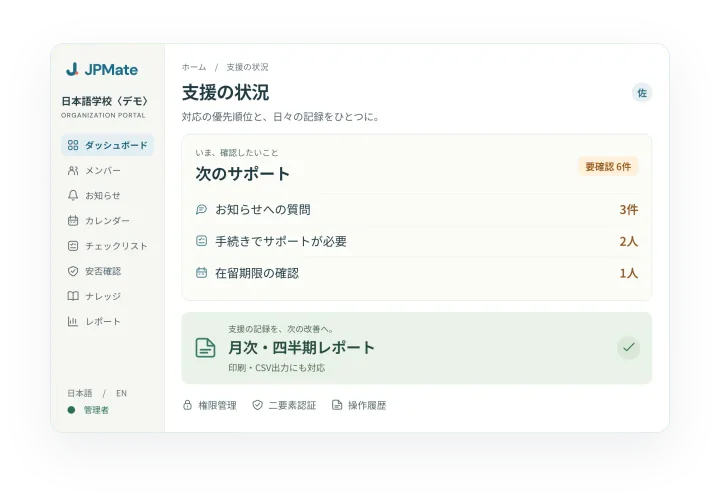
The dashboard gathers what needs attention today: questions waiting for a reply, overdue checklists, people asking for help. Monthly and quarterly records are made for you, and the roster and read receipts export as CSV.

  • StaffBefore each quarterly interview, read in Japanese what the member answered beforehand in their own language.
  • MembersDecide for themselves whether to share their residence-card expiry date and interview answers.
The staff portal dashboard with the next things to handle and the monthly and quarterly report
06 Roster and joining

From a roster or a QR code, in minutes.

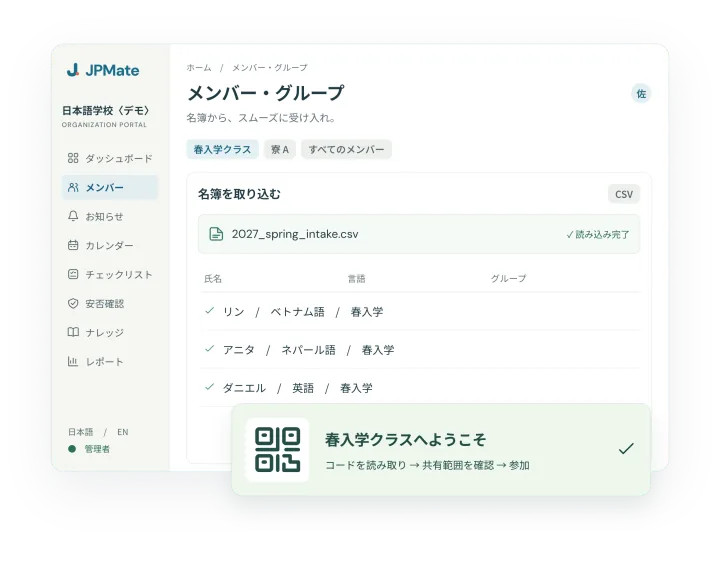
Import your roster as CSV and group people by class, dorm or site. Print the QR invite sheet and members join on their own phones.

  • StaffThe portal works in Japanese and English. We help with the setup.
  • MembersUse the app on iPhone, or a web browser on Android and computers.
Importing a roster as CSV in the staff portal, and the QR invite to a group

Screens illustrate how the portal and app work. People, organizations and numbers are demo data.

The member app

And an app for everyday life in Japan.

Your members get JPMate Premium at no extra cost. When a letter arrives, they can check what it says in their own language before they come to you.

Read Japanese letters

Photograph a letter from the city office and see what it is, the deadline and what to do, in their own language.

Answers with sources

Questions about procedures get answers based on official information, with the source page one tap away.

Never miss a deadline

Save what needs doing and get a reminder.

Prepare for disasters

A checklist for their household, emergency contacts and a guide that works offline.

9 languagesJapanese, English, Chinese, Korean, Vietnamese, Portuguese, Spanish, Nepali, Indonesian

Local informationMostly Sapporo and Ishikari

Privacy and operation

Staff see what support needs, nothing more.

Each member uses their own account. What your organization can and cannot see is clearly separated.

What staff see

  • Roster, groups and each person’s language
  • Who opened a notice, confirmed it or asked a question
  • Checklist progress and safety-check answers

What your organization never sees

  • Members’ chats
  • Letters they scan, and their personal reminders
  • Location

A residence-card expiry date and interview answers are shared only if the member agrees.

Data storage and access

Data is stored in Japan (AWS Tokyo region). Staff accounts have roles and two-factor sign-in, and actions are logged. AI processing uses providers outside Japan; they are named in our data-handling agreement.

People stay at the centre

JPMate helps people understand everyday information. Individual situations and expert questions go to your staff or to specialists. It does not replace interviews.

Getting started

Try it free for 30 days.

One group, up to 50 people. We do the setup, and nothing switches to paid automatically.

01

Call and demo

About 30 minutes online. Tell us what takes your time today and see the real screens.

02

Setup

We help import the roster, prepare notice templates and upload your rules.

03

30-day trial

One group uses it in their normal work.

04

Review

Decide whether to continue, based on the usage numbers and what your staff say.

Contact

Ask about a trial or a demo.

Tell us what kind of organization you are, how many people you support and what comes up most. We’ll get back to you about a free trial or a demo.

JPMate for organizations / 1:28

日本語

Connecting members and support teams

Multilingual AI and an organization portal turn everyday questions about life in Japan into a clear next step, connecting students and employees with the people who support them.

  • AI answers from your organization’s knowledge

    Answers draw on published FAQs and policies, with sources members can open and explanations in a familiar language.

  • Notifications that reach the right people

    Send to everyone, chosen groups or specific members, now or at a set date and time. Each member gets it in the app in their own language; checklists and deadlines follow, and support teams see who needs a hand.

  • Help reaches the people who need it

    Check safety and support needs during emergencies. Members’ chats and letters stay private; they choose whether to share things like their residence-card expiry date.

The film is in Japanese. Screens, names and numbers are for demonstration.